Introduction
India’s education system is increasingly adopting digital technology to make academic records more accessible, organized, and easier to verify. Students often need to manage different educational documents, including marksheets, certificates, academic credits, and other achievements throughout their education.
Keeping track of these records across different schools, colleges, and universities can sometimes become difficult.
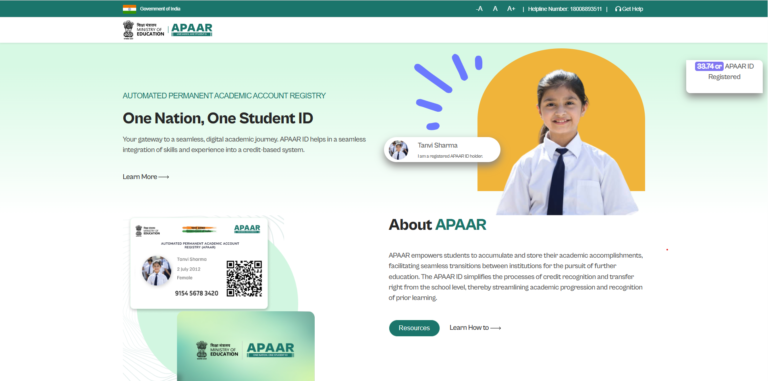
To simplify academic record management, the Government of India introduced APAAR ID under the One Nation, One Student ID initiative.
APAAR provides students with a unique 12-digit identification number that helps connect their academic records and achievements through a digital education ecosystem.
Whether you are a school student, parent, or college student, understanding APAAR ID can help you learn how academic records are digitally managed and accessed in India.
In this guide, DigiStudyLab.in explains what APAAR ID is, its benefits, how students can obtain it, the role of parental consent, the documents required, and how to check its status through official platforms.
What Is APAAR ID?
APAAR stands for Automated Permanent Academic Account Registry.
It is a digital identification initiative introduced by the Government of India under the One Nation, One Student ID programme, aligned with the National Education Policy (NEP) 2020.
APAAR provides each registered student with a unique 12-digit identification number that helps consolidate and access academic records throughout their educational journey.
These records may include:
- School examination marksheets.
- Academic scorecards.
- Gradesheets.
- Degrees and diplomas.
- Educational certificates.
- Academic credits.
- Co-curricular achievements.
- Other recognized learning accomplishments.
APAAR is linked with DigiLocker and the Academic Bank of Credits (ABC), helping students access their academic credentials and supporting the accumulation and transfer of eligible academic credits.
The initiative aims to make academic record management more convenient and support students when changing educational institutions or pursuing further studies.
Official APAAR website: https://apaar.education.gov.in/
What Is One Nation, One Student ID?
One Nation, One Student ID is an initiative designed to provide students with a unified digital academic identity.
Under this initiative, APAAR acts as a unique identification number that connects a student’s academic achievements and records across participating educational institutions.
Instead of relying entirely on physical documents and separate academic records, the system supports digital access and verification of eligible academic information.
The initiative is aligned with the National Education Policy (NEP) 2020, which promotes flexible learning, academic mobility, and improved management of educational records.
Its broader objectives include:
- Creating a unified academic identity for students.
- Supporting digital management of educational records.
- Simplifying academic document verification.
- Facilitating the transfer of eligible academic credits.
- Supporting student mobility between educational institutions.
- Recognizing academic and co-curricular achievements.
- Improving transparency and efficiency in the education ecosystem.
Benefits of APAAR ID for Students
APAAR ID offers several potential benefits for students, parents, and educational institutions.
1. Unique Academic Identity
Each registered student receives a unique 12-digit APAAR ID that serves as a digital academic identity within the education ecosystem.
It helps connect educational records associated with the student.
2. Digital Access to Academic Records
APAAR is linked with DigiLocker, allowing students to access eligible academic documents electronically.
These may include marksheets, certificates, and other credentials issued by participating educational authorities.
3. Convenient Academic Record Management
Students can benefit from having their academic records connected through a digital system instead of managing every record independently.
This can make it easier to access and share eligible educational credentials when required.
4. Easier Transfer Between Educational Institutions
APAAR supports academic mobility by helping institutions identify and verify students’ academic histories.
This can be useful when students transfer between schools, colleges, or universities.
5. Academic Credit Management
Through its integration with the Academic Bank of Credits, APAAR supports the accumulation, transfer, and redemption of eligible academic credits.
This can provide greater flexibility for students pursuing higher education.
6. Reduced Dependence on Physical Documents
Students can access eligible digitally issued academic documents through connected platforms.
This can reduce the need to carry physical copies for certain verification processes, subject to the requirements of the receiving institution.
7. Recognition of Learning Achievements
APAAR is intended to help record recognized academic and co-curricular accomplishments, supporting a more comprehensive view of a student’s learning journey.
8. Support for Further Education
Digital academic records can help simplify document verification during admissions, examinations, institutional transfers, and other educational processes.
The exact use of APAAR depends on the institution and the service involved.
How Does APAAR ID Work?
APAAR works as a unique identification link within India’s digital education ecosystem.
It connects student information with participating educational institutions and digital academic record platforms.
The main components include:
1. APAAR ID
APAAR provides a unique 12-digit academic identification number for registered students.
2. UDISE+
UDISE+ stands for Unified District Information System for Education Plus.
It is a national education information system used to maintain information relating to schools, teachers, and students.
For school-level APAAR generation, student information maintained in UDISE+ plays an important role.
3. Academic Bank of Credits (ABC)
The Academic Bank of Credits is a digital platform that supports the accumulation, storage, transfer, and redemption of eligible academic credits earned through participating higher educational institutions.
Students’ academic credit accounts are linked through their APAAR ID.
4. DigiLocker
DigiLocker provides a digital document wallet where students can access their APAAR ID card and eligible academic documents.
Once an APAAR ID is successfully generated, it is pushed to the student’s DigiLocker account.
These platforms work together to support the digital management of academic records.
What Is the Difference Between APAAR ID, ABC ID, and DigiLocker?
These three terms are closely connected, but they serve different purposes.
| Platform | Main purpose |
|---|---|
| APAAR ID | Provides a unique digital academic identity for students |
| Academic Bank of Credits (ABC) | Supports the accumulation, storage, transfer, and redemption of eligible academic credits |
| DigiLocker | Provides access to digitally issued and uploaded documents |
APAAR ID vs ABC ID
APAAR ID is the student’s unique academic identification number.
The Academic Bank of Credits uses this identity to associate and manage eligible academic credits.
In other words, APAAR provides the identification link, while ABC provides the academic credit management facility.
APAAR ID vs DigiLocker
APAAR ID identifies the student within the academic ecosystem.
DigiLocker is a digital document platform that allows students to access their APAAR ID card and other eligible documents.
For a detailed explanation of DigiLocker, read our guide:
DigiLocker: Registration, Login, and How to Access Digital Documents.
Who Can Get an APAAR ID?
APAAR is designed for students across India’s education ecosystem.
It supports academic record management for learners at different educational stages, including:
- School students.
- Higher secondary students.
- College students.
- University students.
- Students pursuing eligible higher education programmes.
- Learners participating in recognized skill education programmes.
The process of obtaining or linking an APAAR ID may differ depending on the educational level and the institution.
For school students, the APAAR generation process is coordinated through the school using the UDISE+ system.
For higher education students, institutions and the Academic Bank of Credits platform provide the relevant registration and academic account facilities.
Is APAAR ID Mandatory for Students?
APAAR is a government initiative intended to support digital academic record management and student mobility.
However, students and parents should not assume that every school, examination, admission process, or educational service has identical requirements.
The applicable requirements may depend on government instructions, the relevant education board, the institution, and the particular service.
Importantly, the official APAAR process provides for parental consent when generating an ID for a minor student.
Parents should read the official information and consent documentation before authorizing APAAR ID creation.
For the latest instructions, visit:
https://apaar.education.gov.in/
Documents and Information Required for APAAR ID Generation
Before starting the APAAR ID generation process, students and parents should ensure that the necessary information is accurate.
For school-level generation, the official APAAR guidance identifies the following details:
| Required information | Purpose |
|---|---|
| Aadhaar number | Identity authentication |
| Student’s name | Demographic verification |
| Date of birth | Identity and academic record matching |
| Gender | Student information |
| PEN | Unique student identifier in UDISE+ |
| Mobile number | Communication and verification |
| Mother’s name | Student record verification |
| Father’s name | Student record verification |
| Parental consent | Consent for minor students |
The student’s name in the UDISE+ records should match the name associated with Aadhaar.
PEN is mandatory for school-level APAAR ID generation.
If any details are incorrect, students or parents should contact the school before proceeding.
How to Get an APAAR ID for School Students
The APAAR ID generation process for school students is coordinated through their respective schools.
It is not simply a matter of entering personal details into a public registration form.
Parents, students, and school authorities participate in the process.
Follow these steps:
Step 1: Contact Your School
Students or parents should contact their school administration or class teacher to understand the APAAR ID generation process.
The school can explain the requirements and provide the relevant information.
Step 2: Verify Student Details
The school checks the student’s demographic information maintained in the UDISE+ system.
Important details include:
- Student’s full name.
- Date of birth.
- Gender.
- Parent details.
- Aadhaar-related information.
- PEN.
Ensure that the student’s name and other relevant details match the official records.
Step 3: Complete the Parental Consent Form
For students below 18 years of age, parental or legal guardian consent is required for APAAR ID generation.
The school provides the applicable consent form.
Parents should read the form carefully and understand the information being collected and its intended use before signing.
Step 4: Submit the Consent Form
Parents submit the completed consent form to the school.
The school maintains the consent documentation according to the prescribed procedures.
Step 5: School-Level Authentication
The school verifies the student’s information and completes the required authentication process.
The school’s authorized personnel use the UDISE+ APAAR module for the generation process.
Step 6: APAAR ID Generation
After successful verification and authentication, the school initiates APAAR ID generation through the UDISE+ system.
A unique 12-digit APAAR ID is generated for the student.
Step 7: APAAR ID Added to DigiLocker
Once successfully generated, the APAAR ID is pushed to the student’s DigiLocker account.
Students or parents can then access the virtual APAAR ID card through the Issued Documents section.
Important: Students and parents should not share Aadhaar details or OTPs with unauthorized individuals. Follow the school’s official instructions and use only authorized authentication processes.
How Can College and University Students Get an APAAR ID?
The process for higher education students is connected with the Academic Bank of Credits ecosystem.
Students should first check whether their college or university participates in the Academic Bank of Credits system and follow its instructions.
The general process involves:
- Visit the official Academic Bank of Credits portal.
- Review the available student registration instructions.
- Use the supported DigiLocker authentication process.
- Provide the required APAAR identification details.
- Follow the instructions to access or establish the associated academic credit account.
- Confirm that your educational institution is correctly associated with your academic records.
Students who already have an APAAR ID should follow the institution’s instructions for linking or using their existing identity.
Official Academic Bank of Credits website:
Important: The ABC platform is primarily concerned with academic credit management. It should not be confused with the school-level APAAR generation process through UDISE+.
How to Check APAAR ID Status Online
Students and parents can check whether an APAAR ID has been successfully generated.
There are two useful ways to check its status.
Method 1: Check Through DigiLocker
Follow these steps:
- Visit https://www.digilocker.gov.in/
- Log in using your DigiLocker account.
- Open the Issued Documents section.
- Search for APAAR ID or APAAR Card.
- Open the document if it is available.
If the APAAR ID has been successfully generated and pushed to DigiLocker, the virtual APAAR ID card should appear in the issued documents section.
Method 2: Check Through Your School
Students or parents can contact their school administration.
The authorized school personnel can check the APAAR generation status through the APAAR module available in UDISE+.
If the ID has not been generated, the school may be able to identify the reason for the delay or failure.
What to Do If APAAR ID Generation Fails?
Sometimes APAAR ID generation may fail because of incorrect information, demographic mismatches, or authentication issues.
Here are some common problems and their possible solutions.
1. Name Mismatch Between Aadhaar and School Records
The student’s name in UDISE+ should match the name associated with Aadhaar.
If there is a mismatch, contact the school and identify which official record needs correction.
Follow the applicable correction process before attempting generation again.
2. Incorrect Date of Birth
An incorrect date of birth can create problems during demographic verification.
Check the student’s school records and Aadhaar information.
Correct inaccurate information through the appropriate authorized process.
3. Missing PEN
PEN is a mandatory prerequisite for school-level APAAR ID generation.
Contact the school administration if the student’s PEN is missing or incorrect.
4. Aadhaar Authentication Failure
If authentication fails, verify that the Aadhaar details are accurate and follow the official authentication instructions.
The school may help identify the issue and guide parents through the appropriate correction process.
5. APAAR ID Not Appearing in DigiLocker
If the school confirms that the APAAR ID has been generated but it does not appear in DigiLocker:
- Check whether you are using the correct DigiLocker account.
- Verify the mobile number associated with your account.
- Check the Issued Documents section.
- Contact the school to confirm successful generation.
- Follow DigiLocker support instructions if the problem continues.
6. Duplicate APAAR ID or Incorrect Student Details
Do not attempt to generate another APAAR ID independently.
Contact the school or concerned educational authority to investigate the issue and follow the official correction procedure.
How to Download APAAR ID Card from DigiLocker
After successful generation, students can access their virtual APAAR ID card through DigiLocker.
Follow these steps:
- Visit https://www.digilocker.gov.in/
- Sign in to your DigiLocker account.
- Open the Issued Documents section.
- Find the APAAR ID card.
- Select the document.
- Use the available download or document-viewing option.
Keep your digital document accessible and share it only when required for an authorized educational purpose.
If the card is not available, contact your school to confirm whether the ID generation process has been completed successfully.
What Is the Relationship Between APAAR ID and Academic Bank of Credits?
The Academic Bank of Credits (ABC) is a digital platform developed to support the storage and management of eligible academic credits earned by students through participating higher educational institutions.
APAAR provides the unique academic identity associated with the student’s account.
Through ABC, eligible academic credits can be:
- Accumulated.
- Stored.
- Transferred.
- Recognized.
- Redeemed according to applicable academic regulations.
For example, a student studying at a participating higher educational institution may earn academic credits through approved courses.
These credits can be recorded in the student’s Academic Bank of Credits account.
If the student changes institutions or follows an eligible flexible learning pathway, the credit transfer facility may help support academic continuity.
However, credit transfer and redemption are subject to applicable regulations, institutional participation, and recognition requirements.
Official ABC website: https://www.abc.gov.in/
Does APAAR ID Replace School or College Certificates?
No. APAAR is a digital academic identification system, not a replacement for every educational certificate or qualification.
It helps connect academic records and supports access to eligible digital credentials.
Students should continue to follow the document requirements of schools, universities, recruitment authorities, and other institutions.
Where original certificates, physical documents, or additional verification are specifically required, students must follow those instructions.
Is APAAR ID Safe? Understanding Consent and Data Privacy
APAAR is designed to support the secure management and access of academic information through connected government digital platforms.
However, students and parents should understand the consent process and the information involved before proceeding.
Important Points About Consent
- For minor students, parental or legal guardian consent is required for APAAR generation.
- Parents should read the official consent form before signing.
- The official APAAR resource section provides separate forms for generation and for modification, deactivation, reactivation, and cancellation.
- Students and parents should contact the school or appropriate authority if they have questions about their information.
Digital Safety Tips
- Use only the official APAAR and DigiLocker websites.
- Do not share Aadhaar OTPs with unauthorized individuals.
- Avoid submitting personal details through unknown links.
- Keep your DigiLocker login information private.
- Verify requests for student information with the school.
- Do not share your APAAR ID or academic records unnecessarily.
For detailed information about consent, privacy, and the process, refer to the official APAAR resources.
https://apaar.education.gov.in/resource
Frequently Asked Questions About APAAR ID
1. What is the full form of APAAR?
APAAR stands for Automated Permanent Academic Account Registry.
2. How many digits are there in an APAAR ID?
APAAR ID is a unique 12-digit identification number assigned to a registered student.
3. Who introduced APAAR ID in India?
APAAR is a Government of India initiative associated with the Ministry of Education and aligned with the National Education Policy 2020.
4. What is the purpose of APAAR ID?
APAAR provides a unique academic identity and helps students access and manage eligible academic records through connected digital education platforms.
5. Is APAAR ID the same as an Aadhaar number?
No. APAAR ID and Aadhaar are different identification numbers. APAAR is designed specifically for academic record management, while Aadhaar is used for identity-related purposes.
6. Is parental consent required for APAAR ID?
Yes. Parental or legal guardian consent is required when generating an APAAR ID for a minor student.
7. Can parents generate an APAAR ID directly online?
For school students, APAAR ID generation is coordinated through the school using the UDISE+ system. Parents should contact the school, verify the student’s information, and complete the required consent process.
8. What is PEN in APAAR ID registration?
PEN stands for Permanent Education Number. It is the unique student identifier used in the UDISE+ system and is mandatory for school-level APAAR ID generation.
9. Is APAAR ID available through DigiLocker?
Yes. After successful generation, the APAAR ID is pushed to the student’s DigiLocker account, where the virtual card can be accessed through Issued Documents.
10. How can I check whether my APAAR ID has been generated?
You can check the Issued Documents section of DigiLocker. Parents and students can also contact the school to check the generation status through the UDISE+ APAAR module.
11. Can APAAR ID be used when changing schools?
APAAR is designed to support academic mobility by connecting eligible academic records across participating educational institutions. Students should follow the admission and transfer requirements of the receiving school.
12. What is the difference between APAAR ID and ABC ID?
APAAR provides a unique academic identity, while the Academic Bank of Credits manages eligible academic credits associated with that identity.
13. Does APAAR ID contain examination marks?
APAAR is linked with digital academic record systems that can provide access to eligible marksheets, gradesheets, and other academic credentials. The actual records available depend on the issuing institution and its integration.
14. What should I do if my APAAR ID generation fails?
Contact your school and check whether the student’s name, date of birth, Aadhaar details, and PEN are accurate. Correct any discrepancies through the appropriate official process.
15. Can students change or correct their APAAR ID details?
Students and parents should contact the concerned school or authorized educational authority for corrections. The APAAR official resource section also provides documentation concerning modification and other ID-related requests.
16. Does APAAR ID replace DigiLocker?
No. APAAR and DigiLocker serve different purposes. APAAR identifies the student within the academic ecosystem, while DigiLocker provides access to digital documents.
17. Is APAAR ID useful for college admissions and employment?
APAAR can help facilitate the access and verification of academic records. However, students must follow the specific document requirements of the institution or employer.
Conclusion
APAAR ID is an important step towards building a connected digital education ecosystem in India.
By providing students with a unique 12-digit academic identity, the initiative aims to make educational record management more convenient and support academic mobility across participating institutions.
From school marksheets and educational certificates to eligible academic credits, APAAR connects different components of India’s digital education infrastructure through platforms such as DigiLocker and the Academic Bank of Credits.
Students and parents should understand the registration process, verify demographic details carefully, and complete the required consent procedures through their educational institutions.
DigiStudyLab.in aims to make important educational information and government services easier to understand through practical and informative guides.
For the latest instructions and official updates, visit the APAAR portal.
Visit the Official APAAR Website:
https://apaar.education.gov.in/
Explore more Government Services & Portals guides on DigiStudyLab.in.
Official References
- APAAR Official Website: https://apaar.education.gov.in/
- APAAR Frequently Asked Questions: https://apaar.education.gov.in/faqs
- APAAR Resources and Consent Forms: https://apaar.education.gov.in/resource
- Academic Bank of Credits: https://www.abc.gov.in/
- DigiLocker: https://www.digilocker.gov.in/
- UDISE+ Portal: https://udiseplus.gov.in/
- Ministry of Education: https://www.education.gov.in/
Last reviewed: November 13, 2026.
APAAR registration procedures, consent requirements, and academic record facilities may be updated. Students and parents should refer to the official APAAR portal and their educational institution for the latest instructions.